Caffeine icon for ubuntu / lubuntu
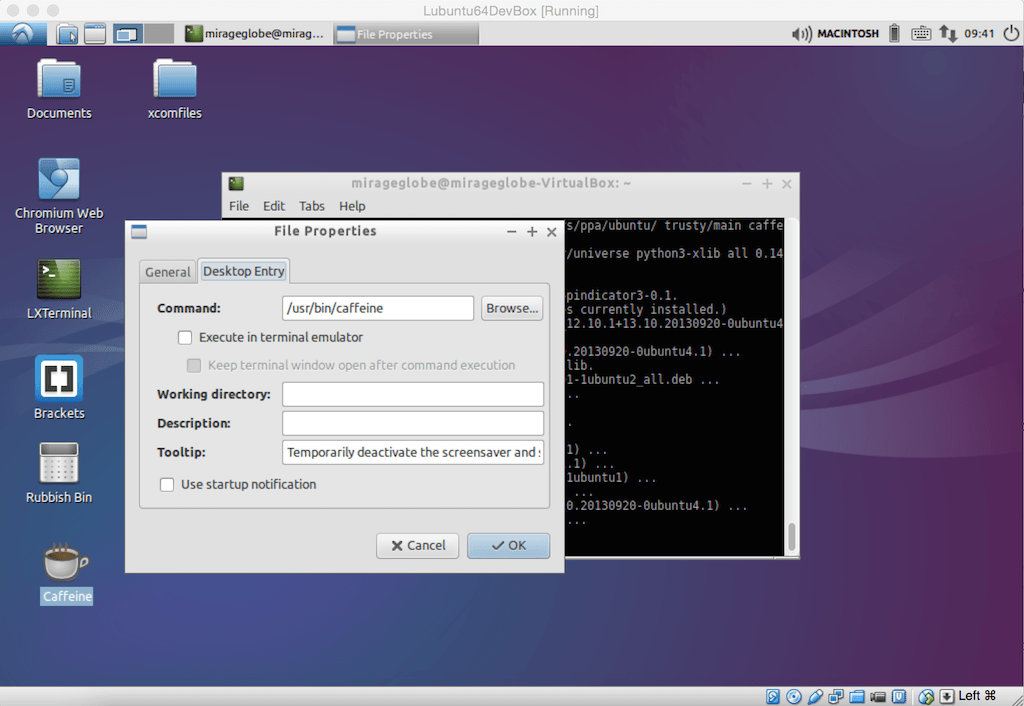
From caffeine 2.8 onwards, the indicator is removed and caffeine starts automatically. Meaning that, if you have a window full-screen, it will trigger. If you wish to get the manual icon back, you can run the following.
Install Caffeine
- opening terminal
- running this line:
> sudo add-apt-repository ppa:caffeine-developers/ppa
> sudo apt-get upgrade
> sudo apt-get install caffeine
- go to accessories -> caffeine and RIGHT click to add the icon on the desktop
- right click on the desktop icon and chose short cut editor
- now click on desktop entry tab
- in the desktop entry tab, change /usr/bin/caffeine to /usr/bin/caffeine-indicator
- now if you (double)click on the icon, it will launch the indicator on the taskbar
This happens as caffeine-indicator is the application for creating the icon rather than caffeine itself. Good luck
Note: You can also opt to download the deb file from launchpad and running it to install the application. https://launchpad.net/caffeine